Skip to main content
| Home / Software / Printing your own GS1 UPC bar codes |
Printing your own GTIN/UPC Bar Codes?
WORTH DATA DOES NOT PROVIDE GTIN, GS1 or UPC NUMBERS - However we sell software so that you can print them and bar code readers so that you can read them! A question we hear quite often at at Worth Data is "I need UPC bar codes for my products. Can I print them myself?" Of course you can and Worth Data can help! |
|
|
Printing your own UPC Codes |
We have a great solution for printing UPC codes: |
|
| LabelRIGHT™ Ultimate for Windows® | |
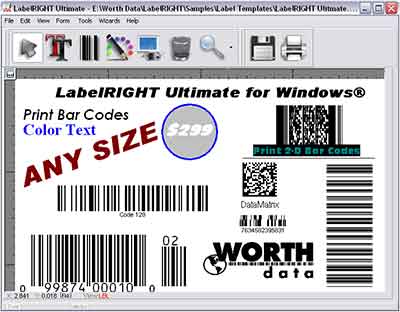
LabelRIGHT Ultimate is a full-featured label design program
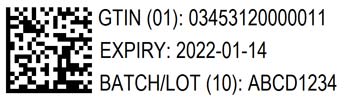
that lets you design and prin LabelRIGHT Ultimate for Windows can print UPC and EAN codes, GS1-128 including Sunrise 2027 GS1 DataMatrix, and GS1 QR codes. It also includes our powerful BarFont™ tools for placing perfect UPC and EAN 1D codes in other Font based programs like Microsoft Office® (Excel®, Word® etc...), Adobe Illustrator®, Adobe Acrobat®, Adobe Photoshop® & Quarkxpress®. LabelRIGHT also offers the graphic output of individual barcodes, or entire label designs in PDF, EPS, TIFF, JPEG or BMP format.
|
|
| Who needs a UPC number? | |
If you sell products to a distributor or directly to a retail outlet for retail sale, you probably will need a GTIN (for the USA a UPC-A 12 digit number at minimum). Most large retailers require one in order to sell your items. Most retailers will also tell you if a UPC number is required and what your product labeling requirements are. If you are selling to a local store you may not need one, and if you are using it for your own inventory you certainly do not need a UPC number - just use another type of barcode like Code 39 or Code 128 to print your product numbers. Many national chains may require a copy of your Uniform Code Council (UCC) (GS1) letter identifying your company’s bar code.
|
|
| Now that I know I need a UPC number, where do I get it? | |
In order to get a registered GTIN GS1 UPC number, you must apply for membership to the GS1 US (formerly the Uniform Code Council) . There is a fee for membership and it is based upon the information you provide about your company and how many product numbers you will need on the on-line application. Fees begin at $250, plus annual renewal fees starting at $50. The full pricing structure can be viewed on the GS1 US website: http://www.gs1us.org/get-started/im-new-to-gs1-us. You can apply online or by phone. The contact information for the GS1 US is: GS1
US WORTH DATA DOES NOT PROVIDE GS1 or UPC NUMBERS - However we get you started printing them, and sell you scanners to read them! |
|
| What is a UPC number? | |
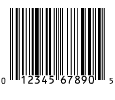
If you buy products in a retail environment, then you are familiar with the bar codes you see on most products in any of your local retail stores. This is called a UPC-A code (GTIN-12), is 12 digits long and looks something like this:
The next 5-9 numbers typically are the "GS1 or UCC Company Prefix". In the bar code sample to the left, this is the number "12345". This is a unique 5-9 digit number assigned to a manufacturer by the GSl. This number will represent the manufacturer on all of their products as well as in any EDI (Electronic Data Interchange) applications. The second set of numbers is the number used to reference that specific product. It is called an "Item Reference Number". This number is not assigned by the GSl. This number is up to the manufacturer and is often assigned in a random manner. In the example bar code above, the Item Reference Number is "67890". The last number is a check digit calculated from the previous 11 digits. It is not randomly assigned. Most bar code printing programs will calculate this check digit for you. The check digit for the example above is "5". In the U.S., UPC-A will remain the primary POS barcode until 2027.
|
|
| The case for not using UPC numbers | |
A strong case can be made to not use UPC or GTIN numbers, especially if you are a small brick & mortar business and can label the products in your store. Why use a bar code that potential customers can now easily scan with a smart phone and try to find for a lower price online? If you want to sell your products to the customers who walk in your door, then using UPC numbers, even if they already exist on the products, may be a losing proposition. Especially in industries with large discrepancies between retail pricing and online pricing. Instead label your products using a in house part number that relates only to your point of sale software and your inventory. Choose a bar code type like Code 39, or Code 128, that is variable length and can have alpha & numeric characters instead of a UPC bar code. Here is an example: Some of these products come from large national & international companies that are using registered GTIN bar codes for the part numbers. If this small brick and mortar business uses the existing UPC number as their part number, then it is easy for a customer to touch and feel the product in the store, then check the online price by simply scanning the bar code with their smart phone and potentially buying the product online for a discounted price. Some online merchants are even offering coupons for $5 off for these types of searches, plus free shipping, heavily discounted prices, and often no local sales tax etc... The alternative is to use a in house generated bar code, with a unique part number to that store, placing this new bar code label over the UPC number to remove the ability for someone to price shop or "showroom" in your store.
|
|
Home | Top | Site Map | Contact Us | About Worth Data | Testimonials |
 |
|





Copyright © 2023 Worth Data, Inc. All Rights Reserved


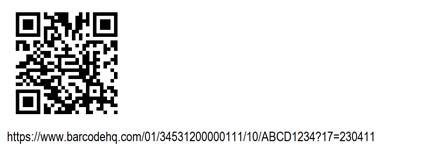
 Another great alternative for labeling is to put a QR code on the label in addition to your inventory bar code - when the QR code is scanned by a customers smart phone it will take them to your website, or to your stores Facebook page - you could even offer a discount (just like the big online retail companies) for a social media tag.